Simple pricing for your shul

Three plans. Start with what you need and add the rest when you want it.

One flat price per shul, whatever the size of your membership. The usher app, and texts on Standard and Full, come with the plan, not as add-ons.

Seating

The seat map, priority windows and makom kavuah, with your people and households. No lobby screens.

$49 a month

Launch price · Regular price: $99 a month

First month free · No setup fee

  • Seat map, windows and makom kavuah
  • Members, families, care and tasks
  • Email only
  • No lobby screens
  • 1 GB of files
Start free trial

No card required

Standard

Most shuls

Everything in Seating, plus the calendar and yahrzeits, sign-ups and aliyos, money, messages, documents and reports, and one lobby screen.

$79 a month

Launch price · Regular price: $149 a month

First month free · No setup fee

  • Seat map, windows and makom kavuah
  • Members, families, care and tasks
  • Hebrew calendar, zmanim and yahrzeits
  • Aliyos, kibbudim and sign-ups
  • Dues, donations and payments
  • Email, texts and WhatsApp
  • Documents and forms for members
  • Reports on giving, dues and who owes
  • Lobby TV screens
  • Hebrew school and day camp: classes, bunks, attendance and pickup
  • 500 texts a month
  • 1 lobby screen
  • 10 GB of files
Start free trial

No card required

Full

Everything in Standard, plus events, the gallery, your shul's own website and up to five lobby screens.

$99 a month

Launch price · Regular price: $199 a month

First month free · No setup fee

  • Seat map, windows and makom kavuah
  • Members, families, care and tasks
  • Dues, donations and payments
  • Hebrew calendar, zmanim and yahrzeits
  • Aliyos, kibbudim and sign-ups
  • Events, tickets and dinners
  • Email, texts and WhatsApp
  • Documents and forms for members
  • Reports on giving, dues and who owes
  • A photo gallery
  • Lobby TV screens
  • Your shul's own website
  • Meal trains for families who need help
  • Hebrew school and day camp: classes, bunks, attendance and pickup
  • 2,000 texts a month
  • 5 lobby screens
  • 50 GB of files
Start free trial

No card required

Launch offer: your first month free and no setup fee.

Card and bank payments: Stripe's standard rate plus 0.25% to Shulside. Donors can choose to cover the fee.

Set everything up privately: nobody at your shul hears from Shulside until you're ready.

Ask about pricing

Everything included

See everything that's included

Every part of Shulside, plan by plan, next to what typical shul software does.

Everything included
What you getShulsideTypical shul software
Members and families
Members and families, with Hebrew names and datesIncludedUsually included
A member directory, where each family chooses what it sharesIncludedUsually included
A member page to see and pay what's owed, with every receiptIncludedStandard and FullUsually included
An online seats-and-membership form for new familiesIncludedStandard and FullUsually included
A phone app for ushers and the treasurer, includedIncludedExtra cost
Care and follow-ups: private notes only the people you choose can read, and remindersIncludedUsually included
Your own fields for anything you keep track ofIncludedUsually included
Staff roles: each volunteer sees only their partIncludedUsually included
The whole app in Hebrew as well as EnglishIncludedRare or none
Two-step sign-in for the office, with Face ID or a codeIncludedUsually included
Money and payments
Online giving, with a link and a QR codeIncludedStandard and FullUsually included
Monthly giving and dues, charged automaticallyIncludedStandard and FullUsually included
Pledges and campaigns with a progress meterIncludedStandard and FullUsually included
Zelle, bank, OJC, Donors Fund and Pledger payments matched to familiesIncludedStandard and FullRare or none
After Shabbos, the week's kibbudim and nedarim on one sheet, charged in one goIncludedStandard and FullRare or none
Building fund and campaign meters on the screens and the members' home pageIncludedStandard and FullRare or none
Cards, bank transfer (ACH) and PayPalIncludedStandard and FullUsually included
Take a card in person with your phone, at the door or the kiddushIncludedStandard and FullUsually included
Send a pay link by text or email: anyone pays in a tap, no account neededIncludedStandard and FullUsually included
Payment plans: a balance paid weekly or monthly from a saved card, stopping by itself when it's paidIncludedStandard and FullUsually included
Card and bank payments: Stripe's standard rate plus 0.25% to Shulside. Donors can choose to cover the fee.IncludedStandard and FullProcessing fees vary; often extra
Bank deposits, and a stack of checks entered at onceIncludedStandard and FullUsually included
Expenses, kept next to incomeIncludedStandard and FullUsually included
Year-end tax statements for every familyIncludedStandard and FullUsually included
Seating
Members pick their own High Holiday seats, like booking a flightIncludedRare or none
Priority windows: seat holders choose first, and last year's seats wait for themIncludedRare or none
One person chooses seats for the whole familyIncludedRare or none
Members can see who sits nearby, if the shul turns it onIncludedRare or none
AI drafts your seat map from a photo of your chartIncludedRare or none
Printed seat cards and the chart to hang upIncludedUsually included
Shabbos and davening
The Shabbos sheet builds itself every weekIncludedStandard and FullRare or none
Aliyah requests, aliyah history and suggestions, and the gabbai's Friday reportIncludedStandard and FullRare or none
Minyan sign-ups, a call when you're short, and an alert if it's offIncludedStandard and FullRare or none
The kibbudim auction: the honors list before, the sheet on the day, the bills afterIncludedStandard and FullRare or none
The Hebrew calendar, zmanim and davening timesIncludedStandard and FullUsually included
Yahrzeit reminders to families, sent automatically by the Hebrew dateIncludedStandard and FullUsually included
Kiddush and other sponsorships, sponsored onlineIncludedStandard and FullUsually included
Shiurim: the schedule, reminders to those who come, and the online linkIncludedStandard and FullUsually included
A live kiddush meter, up to a fully sponsored kiddush, on the site, screens and sheetIncludedStandard and FullRare or none
Sponsorship banners on the screens, the sheet and the websiteIncludedStandard and FullRare or none
Events
Events with tickets and online paymentIncludedFull onlyUsually included
Dinner tables and seats, from who bought whatIncludedFull onlyUsually included
Volunteers and tasks: lists for events and meetings, a sign-up link, reminders and Mark doneIncludedUsually included
Events that remember: last year's menu, tasks and notes come forward to this yearIncludedFull onlyUsually included
Each event's budget against what it really cost, and the events reportIncludedFull onlyUsually included
Meal trains for shiva, a new baby or surgeryIncludedFull onlyRare or none
Mishloach manos for Purim: families order online, you print the cardsIncludedStandard and FullExtra cost
Kids
A kids davening program: points, prizes and Davening DollarsIncludedRare or none
Messages
Text messages included in the planIncludedStandard and FullExtra cost
WhatsApp messagesIncludedStandard and FullRare or none
Nothing goes out on Shabbos or Yom TovIncludedStandard and FullRare or none
Email to everyone or to a groupIncludedStandard and FullUsually included
Automatic messages that follow the Hebrew calendar: yahrzeits, birthdays, anniversariesIncludedStandard and FullRare or none
Design flyers in Canva from inside the appIncludedRare or none
Website and lobby screens
Lobby TV screens that run themselvesIncludedStandard and FullRare or none
A "We Belong" wall of member families, on the screens and as a posterIncludedStandard and FullRare or none
Your shul's photos on the lobby screensIncludedStandard and FullRare or none
Your shul's own websiteIncludedFull onlyUsually included
A photo galleryIncludedFull onlyUsually included
Documents and forms for membersIncludedStandard and FullUsually included
A private vault for board papers, opened only by the people you nameIncludedStandard and FullUsually included
Reports and accounting
Reports: who owes and for how long, top donors, year over year, income against expensesIncludedStandard and FullUsually included
A yearly budget, with income and expenses against itIncludedStandard and FullUsually included
QuickBooks syncIncludedStandard and FullUsually included
Switching and support
We bring your members in for youIncludedUsually included
Past payments, pledges and balances come with youIncludedStandard and FullUsually included
Set up privately: nobody hears from us until you're readyIncludedUsually included
Your data is yours: download everything at any timeIncludedUsually included

How it feels

Not more features: what it's like to use, day to day.

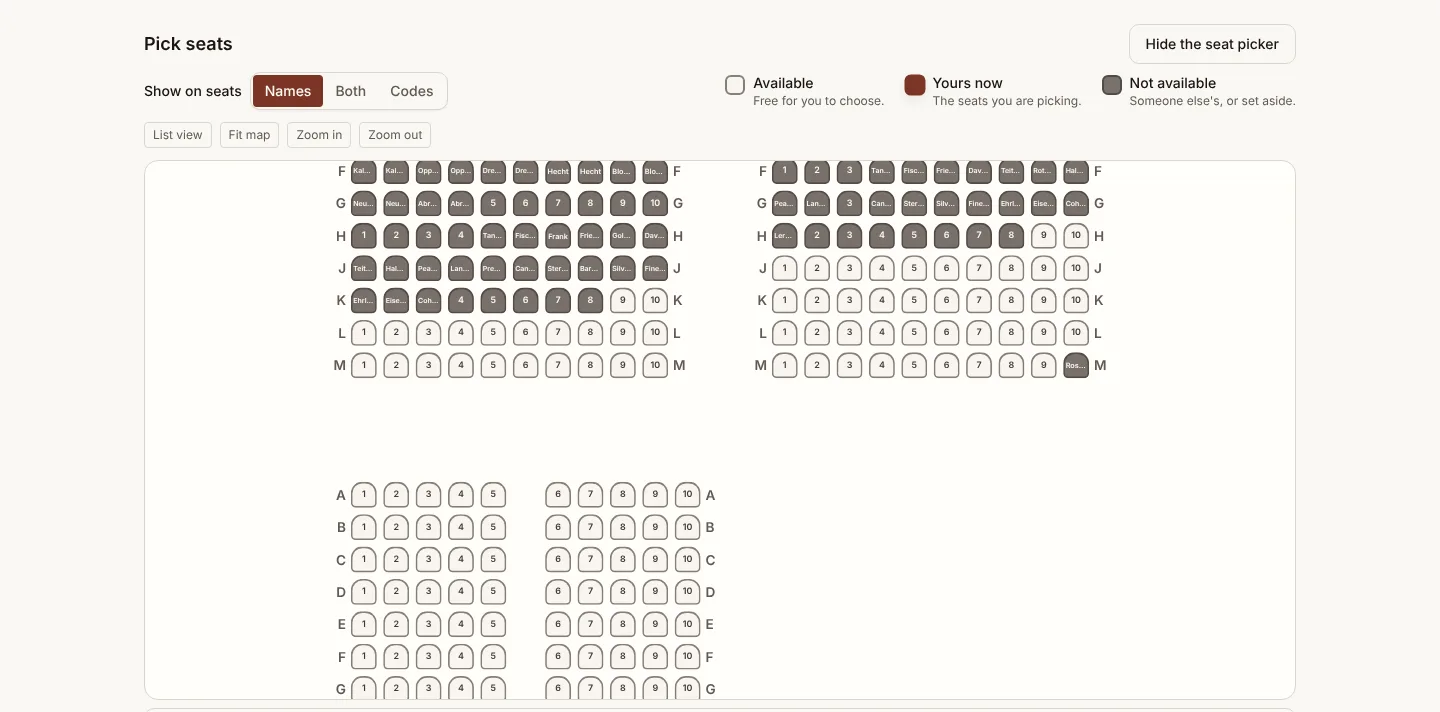
The seat map in a browser: the sanctuary's sections and rows, each family's seats marked, and a button to keep each seat.

Modern and classy

Designed like the apps your members already use, not like office software from 2005.

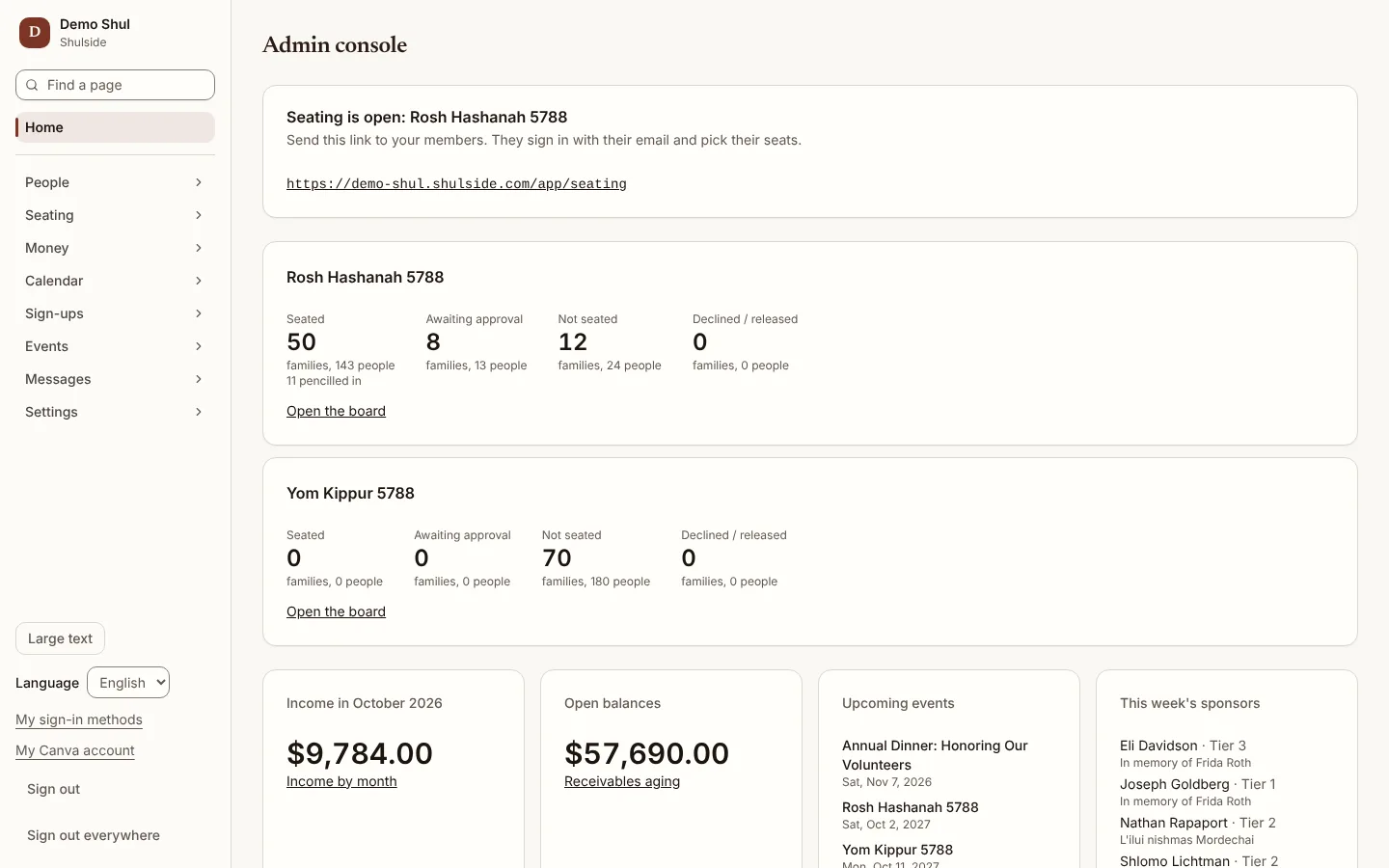
The office's home page: seating open with the link to send, each holiday's seats with Open the board, this month's income, open balances, upcoming events and this week's sponsors.

A simple flow

Every page has one clear next step, so a volunteer learns it in minutes.

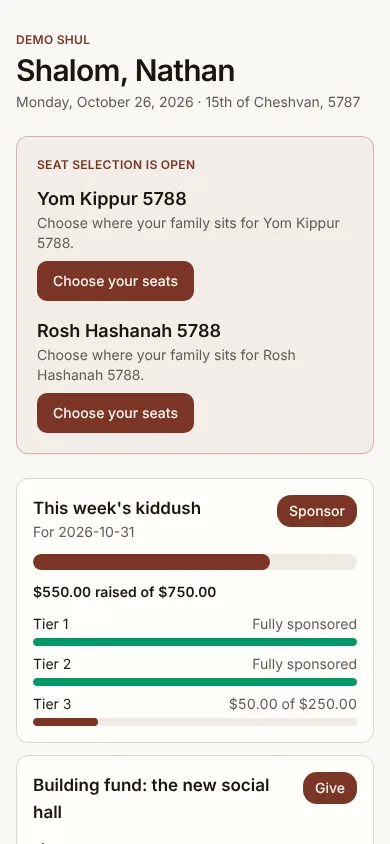
A member's home on a phone: Choose your seats for each holiday, this week's kiddush meter with a Sponsor button, and the building fund.

Phone-first

Members do everything from their phone, and a large-text setting is there for older members.

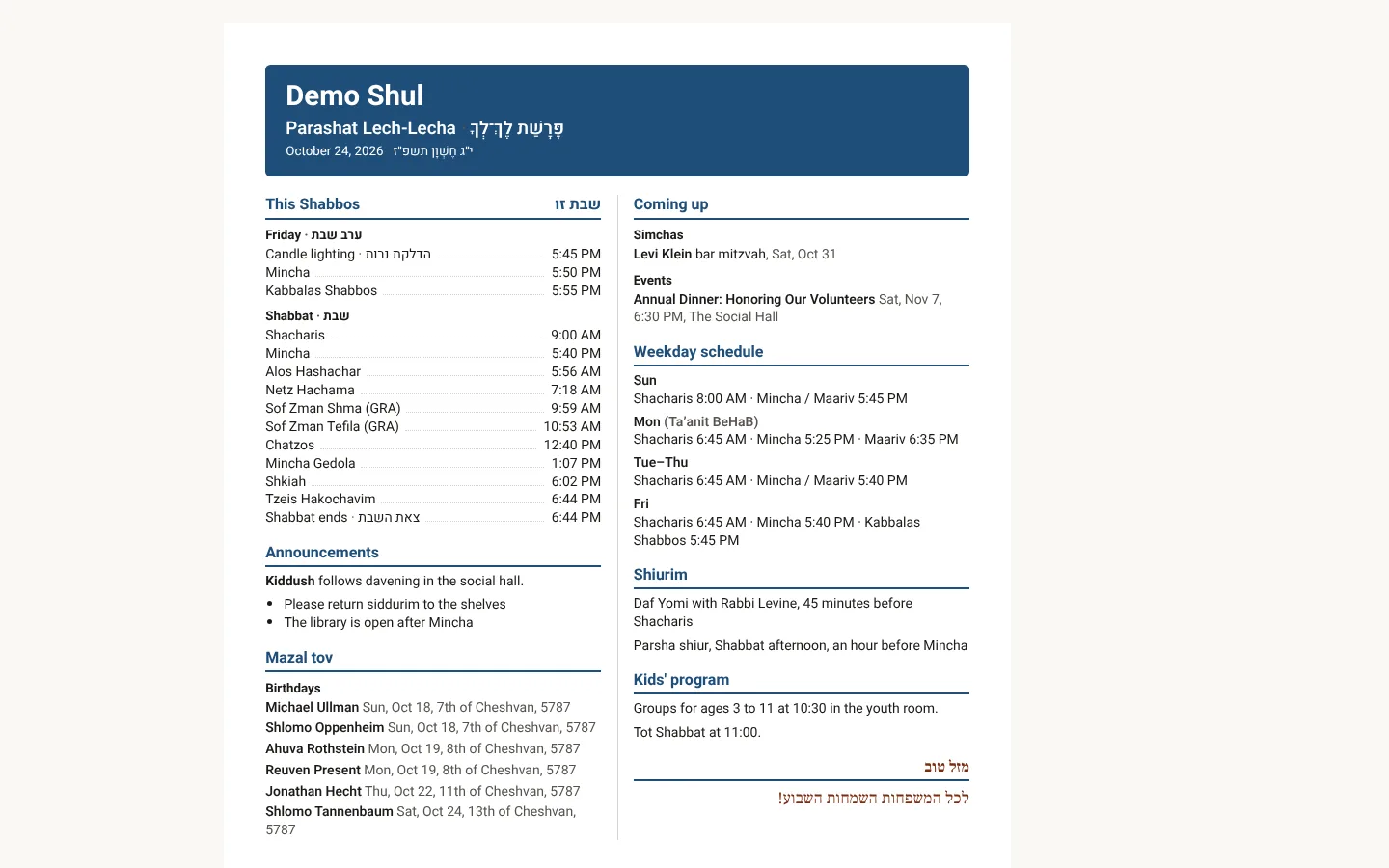
The weekly Shabbos sheet, filled in by itself: the parsha in English and Hebrew, Friday and Shabbos times with their Hebrew names, announcements and birthdays.

Built for Shabbos and Hebrew

Nothing goes out on Shabbos or Yom Tov, and the app works in Hebrew throughout.

Questions

What shuls ask us

Do our members need to download an app?

No download needed. Members use the shul's own web address on any phone or computer, and can add it to their home screen to use it like an app, with notifications if they turn them on. The gabbai, the ushers and the treasurer also have a staff app.

Can it handle our aliyos and kibbudim?

Yes. Families ask for an aliyah online, the gabbai gives them out on a board, and the Friday list goes out by itself with a printed copy. Kibbudim for the year can be sold or given.

Can members pay online?

Yes. Members pay dues, pledges, a kiddush or a sponsorship by card, and dues can go on autopay. The money goes to the shul's own account with the payment provider.

What about Shabbos?

Messages, reminders and receipts never go out on Shabbos or Yom Tov, and autopay and payment plans charge nothing until it ends. Lobby screens switch to a quiet display by themselves: frozen, or one fixed slide, your choice.

How do we get our data in?

Three ways. Import your families and money history (open balances, pledges and payments) from ShulCloud or QuickBooks, or from an Excel or CSV file; an import never sends anything to your members. Send us your spreadsheet and last year's seating chart, and we bring it in for you. Or send families the link to your seats and membership form: they fill in their name, email and phone and choose their seats and membership, and the office reviews each one.

Can we keep last year's seats for the families who had them?

Yes. That is makom kavuah: each family's seats from last year are held for them until your renewal deadline. After it, unclaimed seats go to the next window.

Can we start with seating only and keep our current billing system?

Yes. The Seating plan exists for exactly that. Who sits where exports to a spreadsheet for whatever system you use today, and you can add the rest later.

Do we need special TVs for the screens?

No. Any TV with a browser, or a small streaming stick like a Fire TV or Chromecast, pairs with a code. We set the first one up with you.

Is it only in English?

No. The whole app is also in Hebrew, right to left, and Hebrew names, Hebrew dates and the Hebrew calendar are built in.

Is our data safe?

Yes. Each shul is walled off from every other, every file is backed up every night, and the papers you choose go in a vault with a sign-in check, access per folder and a log of every open.

Can we leave?

Any time. The shul's owner can export its data whenever they like.

Is it for churches too?

A version for churches is on the way. Today Shulside is built for shuls.
Bring the whole shul onto one system before the next Yom Tov

Start today and have the basics running in an afternoon, or let us show you your own shul first. We move the rest over for you, history and all.